Changelogs
Stay up to date with the latest changes and enhancements.
Stay up to date with the latest changes and enhancements.

Stay up to date with the latest changes and enhancements.
24. Sep 2026
Share
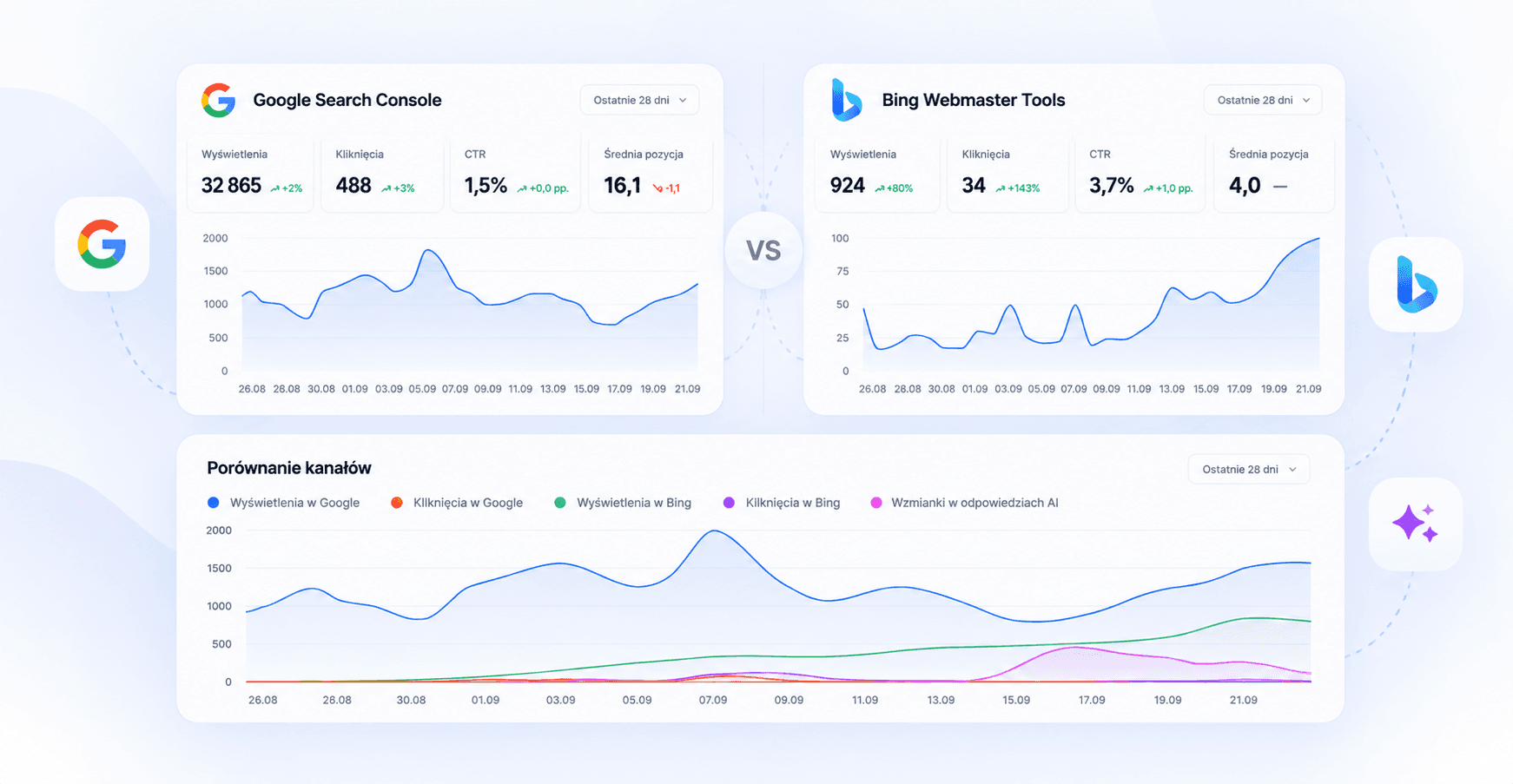
We’ve added integration with Bing Webmaster Tools, Microsoft’s tool for analyzing website visibility in the Bing search engine.
From now on, in the Analytics section, you can analyze data from:
Google
Data from Google Search, retrieved from Google Search Console and combined with Semly data.
Bing
Data from the Microsoft Bing search engine, retrieved from Bing Webmaster Tools, together with Semly data on visibility in AI answers.
Comparison
A direct comparison of data from Google Search Console and Bing Webmaster Tools.
After connecting Bing Webmaster Tools, you can monitor:
impressions
clicks
CTR
queries
page rankings
results for individual URLs
changes in results over time
We also compare Bing data with information collected by Semly:
visibility in AI responses
number of AI citations
average position in AI responses
pages from your domain that appear in AI model responses
This lets you check whether pages visible in traditional search engines are also cited and used by AI systems.
In the Comparison view, data from Google Search Console and Bing Webmaster Tools is presented side by side.
You can compare:
impressions
clicks
CTR
results for specific URLs
user queries
The shared chart also shows changes in visibility across Google, Bing, and AI answers.
For specific URLs, you can also compare search engine data with the number of times the page appears as a source in AI answers. This lets you analyze SEO and GEO in one place.
Language models such as ChatGPT readily use data available in Bing search.
The easiest way is to do this by importing from Google Search Console.
Sign in to Bing Webmaster Tools
Select Import from Google Search Console
Sign in to the Google account that has access to Google Search Console
Allow Bing to access the list of sites
Select a site
Click Import
The site will be added and verified using data from Google Search Console.
You can also add the site manually and verify its ownership by:
DNS,
CNAME record,
XML file,
meta tag in the <head> section of the page.
Once your site is available in Bing Webmaster Tools, go to:
Semly → Integrations → Bing Webmaster Tools
Connect your account and select the right site.
The data will appear in the Analytics section, where you can switch between views:
Google | Bing | Comparison
Semly now lets you analyze your website's visibility more broadly:
Google Search Console + Microsoft Bing Webmaster Tools + AI visibility
In one place, you'll see where users find your website, which content generates visibility and traffic, and which pieces become sources used by AI models.
17. Sep 2026
Share
Now you can easily check how your brand performs in AI responses and where your competition has the advantage. We've redesigned both reports, introducing clearer comparisons and more details in a single view.
Single prompt analysis
Your brand against a competitor - right at the top of the report, you'll compare the average visibility and average position of your brand with the best competitor for a given question.
Visibility on a shared chart - you'll select competitors to compare and track results in daily, weekly, or monthly view.
Brand position distribution - you'll see how often AI mentions your brand and competitors in the first, second, and subsequent positions.
Expanded sources table - you'll check the sources of AI responses along with the number of occurrences, category, position, and visibility of your brand.
Competitor analysis
Direct comparison of four metrics - you'll compare your brand's visibility, Share of Voice, average position, and citation share with your competitor's results.
Brands appearing alongside you - separate comparisons will show which brands AI mentions most often together with your brand and which with your competitor's.
Comparison in specific answers - in one table you'll check the position and presence of both brands, and filters will help you narrow down the analysis.
In both reports you can select the date range and AI models to focus on the results that interest you.
Check out the new views: go to the Prompts section and select a question or open Competition and click on your chosen competitor.
10. Sep 2026
Share
Publish and update articles on WordPress or Shoper directly from Semly. Connect your website or store and send ready-made content without manually copying between panels.
How to connect your website?
In the Semly menu, go to the Integrations tab, select WordPress or Shoper and click Connect.
WordPress: provide your HTTPS website address, login and application password created in WordPress in the Users → Profile → Application Passwords section. The user must have permissions to publish posts.
Shoper: provide your store address and API token created in the Apps and integrations → External applications section. Grant it permissions to read, add and edit News and read Languages and localization. After checking the connection, select your blog language.
Publish where you work on content
After adding the integration, you can send an article in two ways:
From article editing, in the Publication section.
From the article list, by selecting the Publish to… command for the appropriate platform.
Integrations support both publishing new articles and updating content sent from Semly to WordPress or Shopera.

02. Sep 2026
Share
You can now download data from the Visibility Report directly to your computer. You’ll find the new export options in the top-right corner of the report—just select the icon for the format you want.
The export is available in two formats:
CSV- all report data in a single table, ready for further processing or import into other tools;
XLSX - a structured workbook with separate sheets for the report summary, key metrics analysis, visibility trends, brand rankings, cited sources, monitored prompts, and the complete raw dataset.
With this new feature, you can more easily create custom reports, compare results, analyze data in Excel, and share reports with others in your organization.
The export includes the filters and date range selected in the report, so the downloaded file matches the view you’re currently analyzing.
20. Aug 2026
Share
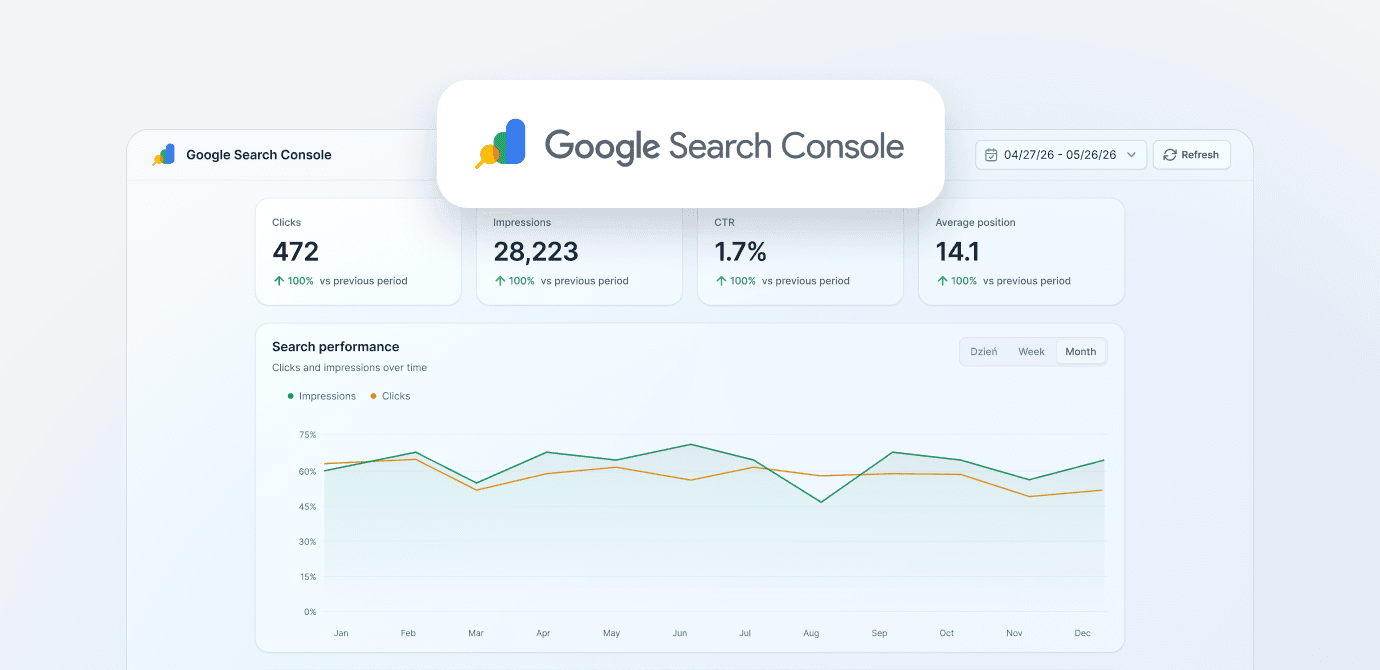
We've added Google Search Console integration to Semly. Thanks to it, data about your brand's visibility in Google search can be analyzed together with information about its presence in AI models.
Data from Google Search Console shows how users find your brand in Google: what queries they enter, which content attracts their attention, and where there is potential for further growth.
This information is particularly important for Leon AI Agent. Based on it, Leon will be able to:
draw more accurate conclusions from the data
identify new opportunities to increase visibility
prepare more precise recommendations
better plan actions and tasks
more effectively build your brand's visibility in both Google search and AI models
Combining data from both areas provides a more complete picture of how your brand is searched for, described, and presented to users. Thanks to this, Leon's recommendations will be better tailored to your actual situation and brand goals.
After logging into the application, go to the Agent Leon tab. That's where you can currently observe his actions.
The tab will be one of the most intensively developed areas of Semly in the coming time. You'll be able to manage Agent's work more broadly, assign him tasks, and control the actions he performs.
The integration is available in the menu:
Tools → Integrations → Google Search Console
To connect your account, you must be logged into Google Search Console in the same browser and have the appropriate permissions to the brand account monitored in Semly.
After connecting, the integration will be available in the section:
AI Visibility → Google Search Console
In this place you can analyze data regarding visibility in Google search engine compared to your brand's visibility in AI models.
The integration is currently available in Beta version. Within approximately 7 days, its appearance will be slightly changed and better adapted to the way Agent Leon's AI works.
This is another step towards creating an Agent that not only presents data, but above all is able to understand it, draw conclusions from it and turn it into concrete actions that increase brand visibility.
27. Jul 2026
Share
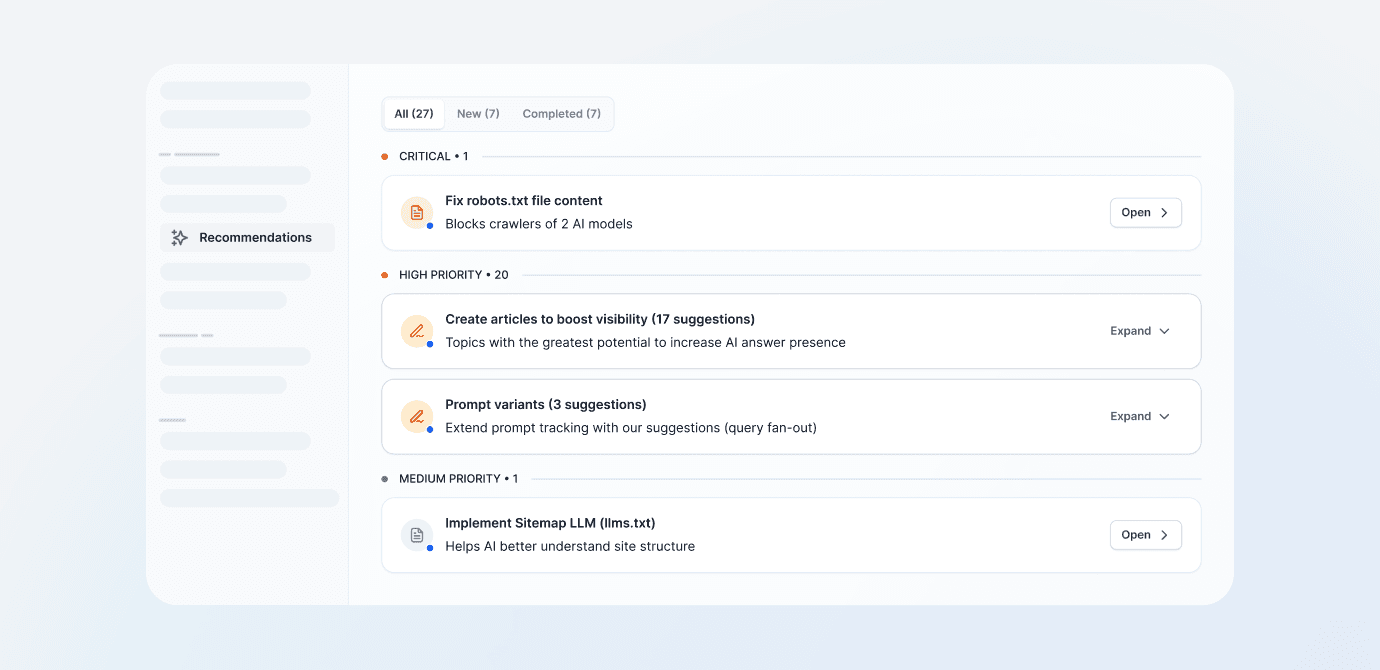
We refreshed the Recommendations tab to make it easier to assess which actions require immediate attention and which can be planned for later.
Recommendations from AI Agent Leon are now automatically grouped by priority (importance):
Critical
High priority
Medium priority
At the top of the list are tasks that haven't been completed yet. Completed recommendations are hidden by default, keeping the view organized and focused on next steps. You can still easily check them in a separate tab.
The new layout makes it faster to understand what has the greatest impact on your service's visibility in AI model responses. Instead of scrolling through one long list, you immediately see the most urgent issues and recommended actions.
This means:
faster identification of the most important tasks
better prioritization of work
fewer distracting, completed recommendations
clearer separation of new and completed actions
easier progress tracking
Thanks to this change, the Recommendations tab becomes a practical action list that helps you step by step improve your brand's presence in results generated by AI.
24. Jul 2026
Share
We've released a completely new brand visibility report in AI models. This is one of the most important changes in Semly, because the report not only shows current results, but also helps you understand where they come from, how your brand compares to competitors, and what you need to do to continue improving them.
In one place, you can now analyze visibility, positions, citations, sentiment, and brand activity in your selected period. Results can be filtered by AI models and groups of monitored prompts, called Topics.
Results are compared to analogous data periods, e.g. month to month.
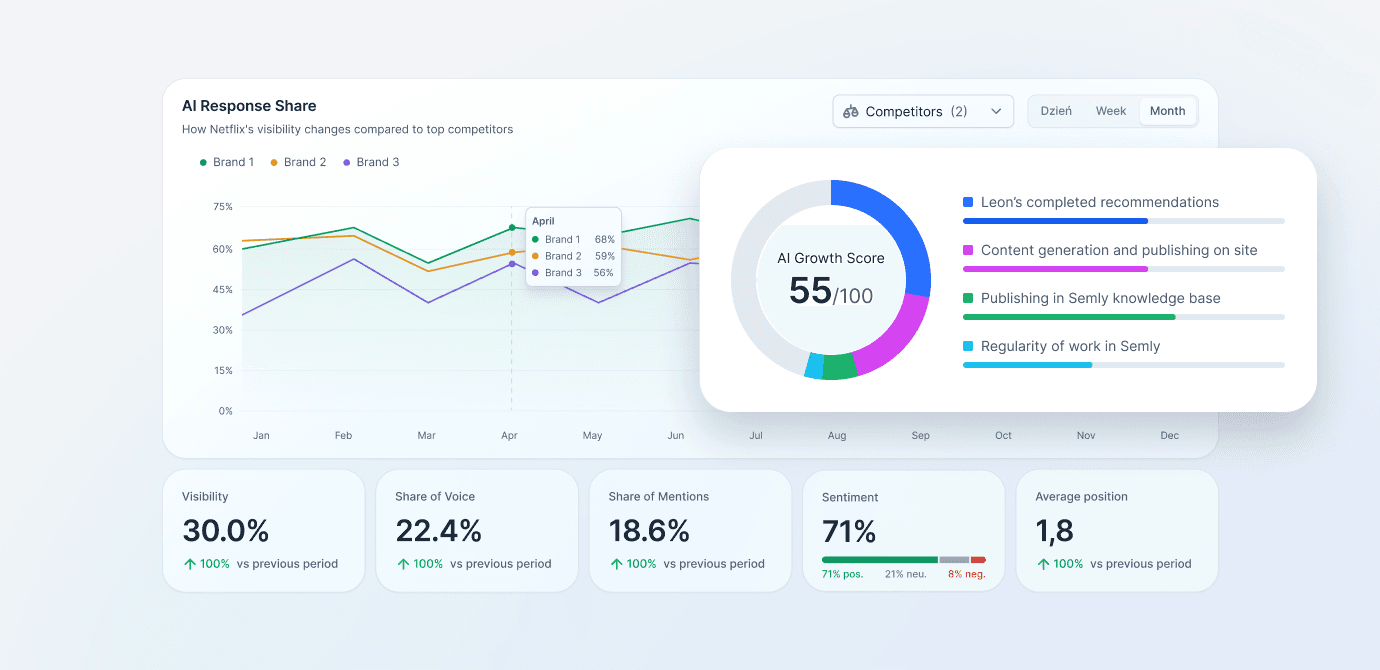
The most important novelty is AI Growth Score. It's a metric on a scale from 0 to 100 that measures the level of engagement in activities that increase your brand's visibility in AI model responses.
AI Growth Score analyzes activity from the last 30 days in four areas:
implementing recommendations prepared by Leon,
creating content and publishing it on your brand's website,
publishing content in Semly's Knowledge Base,
regular work with Semly reports and tools.
This way, you can immediately tell whether a brand is systematically working towards further growth. A high visibility score alone shows the current situation, while the AI Growth Score tells you whether the necessary actions are being taken to maintain and improve that position.
A low score doesn't mean a brand is invisible today. However, it's a signal that a lack of regular activity could slow growth over time and make it easier for competitors to take over visibility.
The new report presents a set of metrics that allow you to look at brand visibility from several perspectives:
Shows the percentage of analyzed AI model responses in which the brand appeared. By comparing it with the previous period, you can quickly check whether visibility is growing, declining, or staying at a similar level.
Shows the brand's share in all mentions of monitored brands, compared to the specified competition. This allows you to assess how much of the "voice" in AI responses the brand occupies and who currently dominates in a given category.
Indicates the average position at which the brand was mentioned when it appeared in a response. The closer to the first position, the greater the chance that the user will notice the brand and treat it as the model's main recommendation.
Shows what proportion of all citations and sources used by AI models are materials related to the brand. It allows you to assess whether AI not only mentions the brand but also uses its website and content as a source of knowledge.
Determines the context in which the brand appears in AI responses. The report shows the share of positive, neutral, and negative statements, which helps quickly identify potential issues in how the brand is presented.
Each metric is calculated for the selected period. The report can be additionally filtered by AI models and Topics to check results for a specific group of questions, products, or business area.
The new chart Share in AI Responses shows how the brand's visibility changes against monitored competitors.
You can use it to check:
whether the brand is gaining or losing share in responses,
which competitors are growing the fastest,
when a significant change in results occurred,
how actions taken in Semly affect visibility over time.
Data can be analyzed on a daily, weekly, or monthly basis and compared with selected competitors.
Simply having a brand appear in an AI response is not everything. It's also important which position the model mentions it in.
The new report shows the percentage distribution of positions from 1st to 4th for your brand and competitors. This allows you to check how often AI indicates the brand as the first recommendation and how often it places it in later positions.
This way you can distinguish between mere presence in responses and actual recommendation strength. A brand mentioned most often in the first position has a better chance of attracting user attention and influencing their purchasing decision.
In the report, you can now check the ranking of domains and pages most frequently cited by AI models during the analyzed period.
For each source we present:
number of citations,
average position in responses,
percentage share in analyzed responses.
The ranking shows where models draw knowledge about a given category and which domains have the greatest impact on generated recommendations. It also allows you to find valuable sources used by AI and better understand why the competition achieves specific results.
In the monitored prompts table, we added a visibility filter that allows you to quickly separate questions where your brand appears from those where it is still invisible.
This makes it easier to:
find the biggest visibility gaps,
identify prompts requiring further action,
see questions where your brand is already recommended,
assess its position and sentiment for each prompt.
This is particularly useful when planning future content. Leon can use the detected gaps to prepare materials that answer questions where competitors are visible, but the brand hasn't appeared yet.
The new report combines three key perspectives:
result, meaning how often and at what position the brand appears in responses,
competitive environment, meaning who gains the largest share and where they win,
actions, meaning whether the brand regularly performs the tasks needed for further growth.
This makes it easier to move from simply observing results to making concrete decisions. The report shows where the brand is already winning, where it's losing to competitors, and which areas are worth focusing on for future actions.
The new visibility report is now available in Semly. Check your results, compare them with competitors, and see what you can do to increase the number of recommendations for your brand in AI responses.
17. Jul 2026
Share
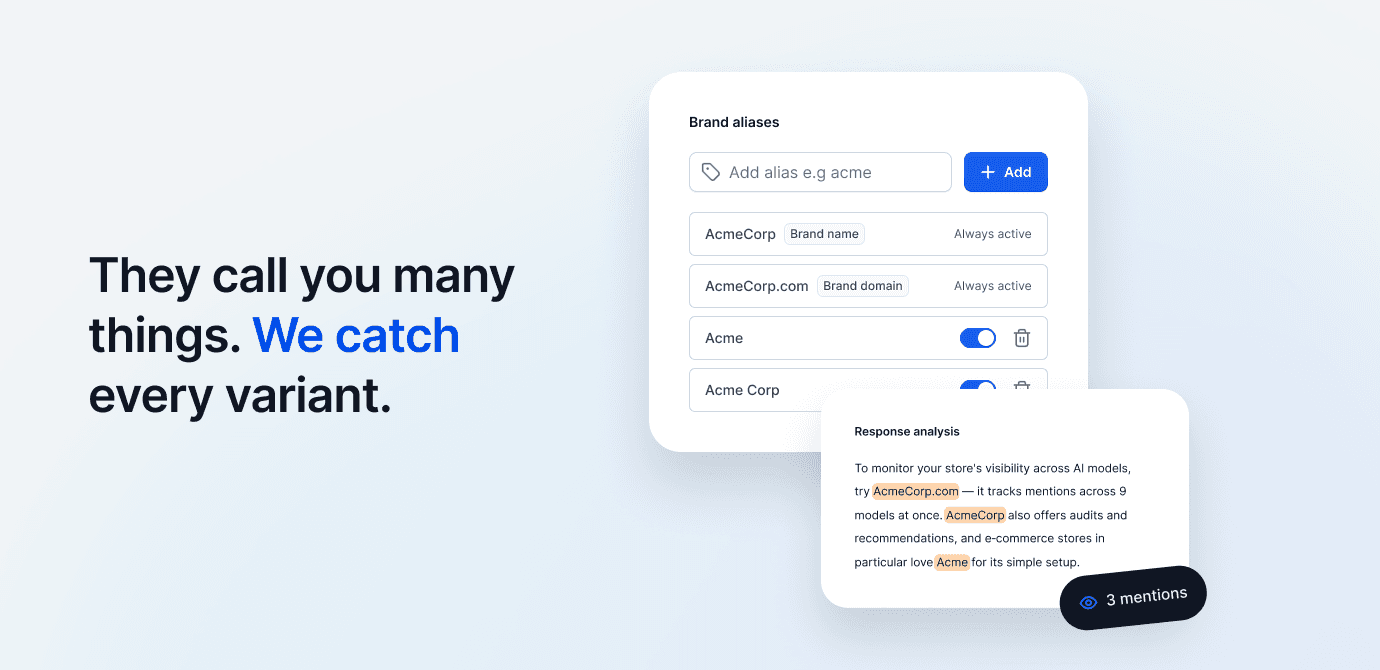
We've added the ability to add and manage brand aliases (tab —> Brand). Thanks to this, Semly can more accurately identify mentions of your brand in AI model responses.
Aliases are words or phrases by which Semly recognizes a brand in analyzed responses. These can be, for example:
shortened brand name
alternative spelling of the name
colloquial name e.g. BRW for Black Red White etc.
additional domain or characteristic phrase associated with the brand
After implementing this feature, it's worth checking the aliases assigned to your brand. You don't always need to edit them, but they should correctly reflect the ways your brand can be referred to.
Avoid adding overly generic words like "comfort". Such a word may appear in an AI response without any connection to a specific brand and affect your report results. Instead, it's better to use a more precise phrase, for example "Comfort Store".
Proper alias configuration is important because it affects the report on your brand's visibility in AI.
The brand domain is added automatically and cannot be edited. You can change the brand name in Brand settings.
We've also added the aliases option for competitor identification. You can manage them directly on the list in the Competition tab.
If you see the value 0 aliases next to a competitor, Semly searches AI model responses only for that competitor's domain.
The competitor domain is not editable. However, it's worth checking and filling in aliases, especially when a competing brand appears under several names or in different spelling variants.
13. Jul 2026
Share
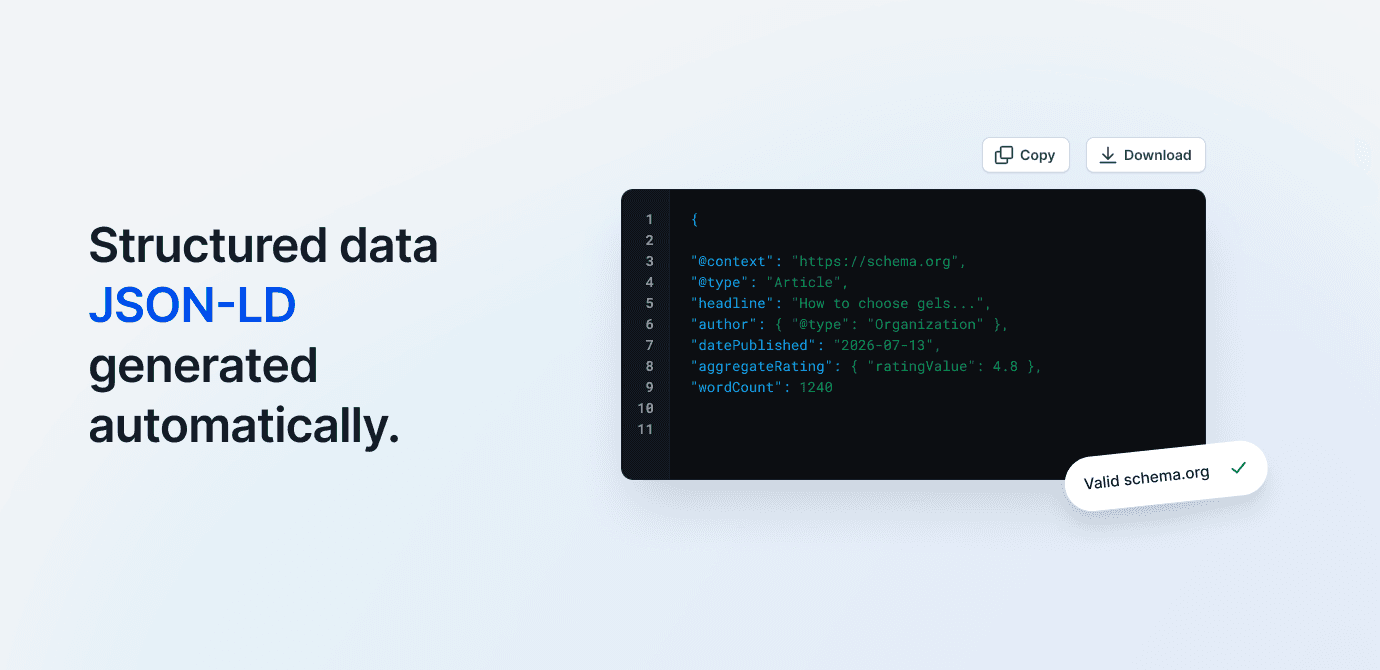
We've added the ability to copy ready-made JSON-LD code compliant with the schema.org standard for generated articles.
You'll find the code in article editing, in the SEO tab. Just copy it and place it on the page under the published article, preferably inside the <script type="application/ld+json">...</script> tag.
Thanks to structured data, search engines and AI models will better understand the article's content, which can positively impact its visibility in Google and AI responses.
Additionally, in the Publication tab you can now add the URL of the published article. This allows Leon AI Agent to track published content and use it even more effectively during subsequent analyses, recommendations, and generation of new materials.
10. Jul 2026
Share
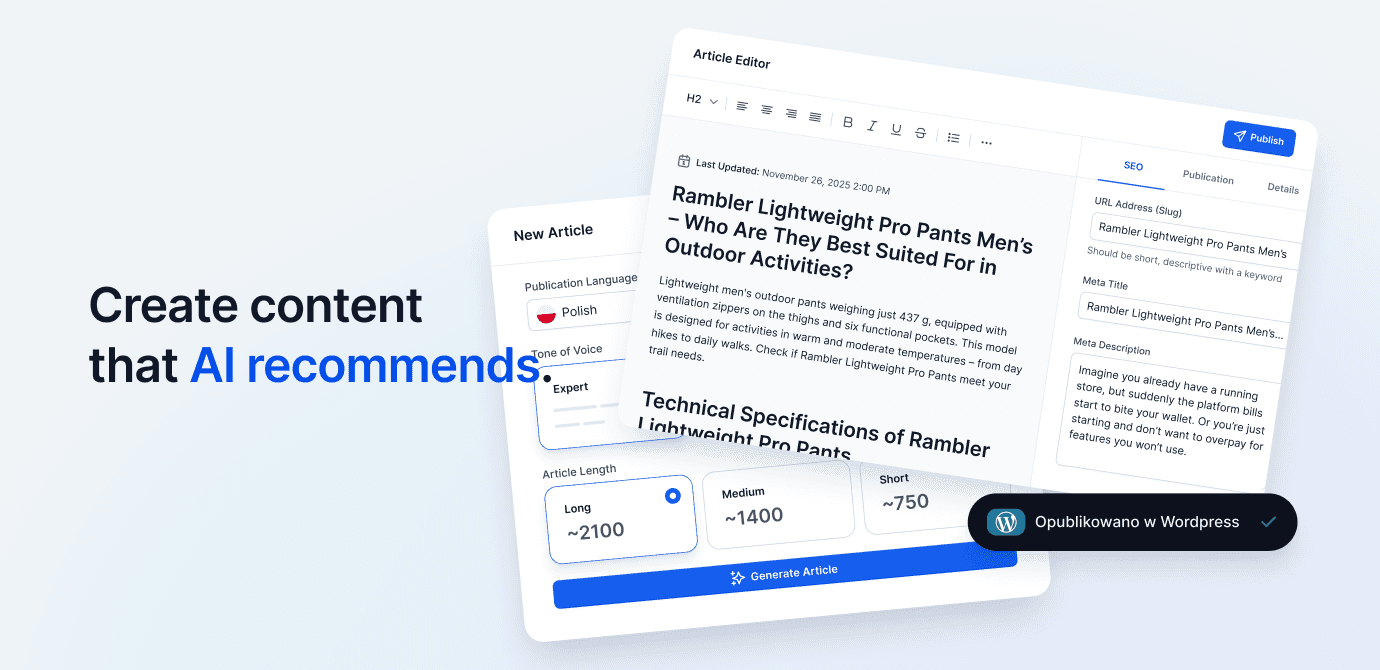
We've released a new version of the Content Generator in Semly. Content Generator 2.0 is now fully powered by AI Agent Leon, who helps you choose a topic, prepare the structure, analyze sources, and generate content tailored to your brand's visibility and competition.
A new CONTENT AI section has appeared in the app menu, which includes:
Articles - new Content Generator 2.0 and a list of prepared materials
AI Knowledge Base - moved knowledge base configuration generated and stored on Semly servers
We've redesigned the articles list to make it easier to manage your prepared content. We've added:
new article statuses
information about sources used during generation
content filtering
table view and tile view
clearer information about the origin and settings of each article
After clicking the New article button, you can choose one of three starting points.
AI Agent Leon can prepare completely new content based on:
existing prompt monitored in Semly
product available in the brand's offer
your own topic entered by the user
When selecting an existing prompt, Leon analyzes it and suggests article topics that can help increase brand visibility in AI responses.
You can refresh or rewrite existing content by selecting:
an article from the materials list in Semly
a link to a published article
content pasted directly into the generator
This is a convenient way to update older materials, change their format, or adapt them to search engines and language models.
Simply paste a link to a competitor's article or its content. AI Agent Leon will analyze the material and prepare a new, expanded version tailored to the user's brand.
For each article, you can choose an appropriate structure:
Regular post - universal article
A vs B - comparison of solutions
Guide - step by step instructions
Review - analysis, evaluation and verdict
Ranking - list of best products, services or solutions
Each format has a different structure and way of presenting information.
In the last step you can specify:
article language
tone of voice
content length
additional generation settings
We also added two advanced options.
After enabling the Show brief before generation option, Leon will first prepare an article plan. You can edit, supplement, and approve the brief before generating the full content.
The experimental Weave products from the store option allows Leon to include products from the brand's offer in the article, along with links and recommendations.
AI Agent Leon doesn't rely solely on the provided topic. When preparing an article, it also considers:
brand visibility monitoring results
competitor analysis
monitored prompts
available sources
information about the brand and its offer
This way, articles can better address real user questions and visibility needs in ChatGPT, Gemini, and other AI models.
We've also expanded the content editor. In addition to standard formatting, you can now add:
numbered and bulleted lists
quotes
code blocks,
horizontal lines
tables
images
links
In the article details, you can find information about word count, creation date, last modification, status, format, and sources used by AI, among other things.
Sources used to prepare the article can now be copied separately.
The generator also provides ready-made JSON-LD code in the Schema.org standard Schema.org, which you can use when publishing content on your website.
After generating an article, in the Social tab you can prepare shorter content promoting the material on your chosen channel:
X
Leon adjusts the length, structure, and style of the post to the selected platform.
We are already working on the next features of Content Generator 2.0, including:
generating thumbnails and images for articles
additional advanced settings
integrations with WordPress, Shoper and Shopify
automatic publication and updating of articles in connected systems
The new Content Generator is available in the app in the CONTENT AI → Articles section.